
Digital Banking LP

Banking that
believes in more.
Digital Banking Transformation
Coming June 30, 2026
A fresh new online & mobile banking experience is coming soon
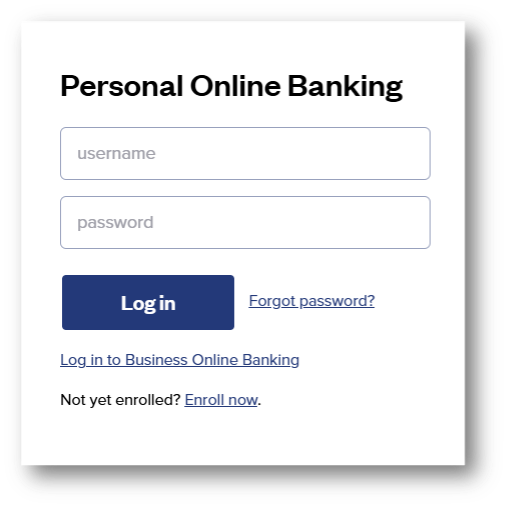
We’re transforming our digital banking system to bring you a more modern, intuitive, and feature-rich way to bank online or from your phone.
Current digital banking users will need to take a few steps before and after go-live to prepare for the transition and access the new platform.
Customers who do not currently use online or mobile banking can continue banking as they normally would, with no interruption to their regular banking experience.
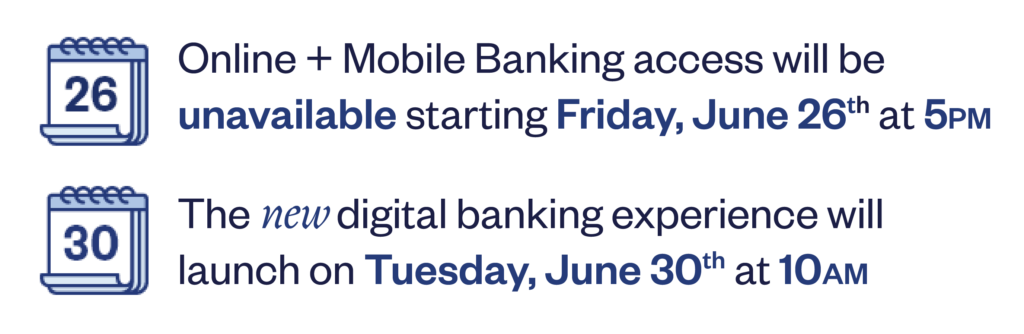
Key dates to keep in mind
For the full list of changes and important dates, see below, and check this page often to get the latest updates as the upgrade date approaches.
While we make this upgrade, online and mobile banking will be temporarily unavailable during the transition period.
How does this impact you?
Questions? We are here for you.
Our Customer Contact Center will have extended hours during the digital banking transition weekend to help customers prepare for and navigate the application enhancements.

NEW
features & improved functions
Our new digital banking experience is designed to make managing your money easier, more organized, and more convenient. From a customizable dashboard and expanded transfer options to enhanced alerts, card controls, mobile deposit, and business banking tools, the updated platform brings more of the features you need into one easy-to-use experience.
Customizable Dashboard
Enjoy a bright, new dashboard designed to make everyday banking easier. Quickly view account information, recent transactions, favorite accounts, and quick links for common tasks.
Account Organization & Favorite Accounts
Group accounts into categories like checking, savings, CDs, youth accounts, or loans, and select up to five favorite accounts for quick access from your dashboard.
Transfers & External Account Access
Link external accounts, view balances in one place, transfer funds to accounts outside of FSB, and send money to other FSB customers with ease.
More Card Controls
Add cards to digital wallets, monitor debit card activity, set real-time alerts, and use CardSwap to update your card information across recurring subscriptions and payments.
Enhanced Alerts
Receive secure messages and customize alerts for account activity, card transactions, ACH transactions, scheduled transfers, login changes, balance thresholds, and more.
Loan Payments & Payment Updates
Schedule or initiate loan payments online or from your phone, and use ClickSWITCH to help update direct deposits and recurring payments.
Personal Finance Manager
Link your expenses and assets to get a more complete view of your finances in one place.
Mobile Deposit
Enjoy an enhanced mobile check deposit experience through the new FSB mobile app.
Custom Login IDs
Change your login ID yourself at any time.
Business Banking Tools
Business customers will have access to a separate Business Banking tab for functions like Remote Deposit Capture, ACH, and wires. Quick actions such as money transfers, employee-locked logins, and transaction approvals will also be easier to find and manage.
How can you prepare?
Ahead of “transition” weekend
Before online and mobile banking become temporarily unavailable on
Friday, June 26 at 5:00 PM, we recommend reviewing the following:
- Review your existing one-time and recurring transfers; these will be preserved during the upgrade.
- Account alerts will not be transferred into the new online banking platform; review existing alerts and prepare to set up in the new platform.
- Take note of any account nicknames you use, as they may not be carried over to the new platform.
- Plan ahead for any online banking, mobile banking, transfer, or mobile deposit needs.
- Be prepared for online and mobile banking to be unavailable from Friday, June 26, through Monday, June 29.
After platform “go live” launch date
The new platform will be available Tuesday, June 30 at 10:00 AM.
Once it is live, current digital banking users should:
Log in for the first time
- Use your existing Login ID.
- Click “Forgot your password” when logging in for the first time to create a new password.
- Please note: Online banking security has been enhanced; passwords must be a minimum of 12 characters.
Download the new app
- Download the new Franklin Savings Bank mobile app from the App Store or Google Play Store on or after June 30.
- Update any saved links or bookmarks you use to access online banking.
Review your account settings
- Verify account nicknames and re-establish them if needed.
- Set up account alerts in the new platform; existing alerts will not carry over.
- New! Security alerts have been added to the current account alert offerings.
Review payments and transfers
- Verify one-time and recurring transfers under the Transfers & Payments tab.
- Accounting and reconciliation software will not be immediately available at launch but is expected to become available within 24 hours following go-live.