
Digital Banking LP

Banking that
believes in more.
Digital Banking Upgrade 2026
At our core, we are a local bank supporting your big dreams and busy lives. To help you keep up with everything you’re chasing down, we will be upgrading our digital banking system this June! Get ready for a fresh new interface, intuitive tracking, advanced features, and so much more.
For the full list of changes and important dates, see below, and check this page often to get the latest updates as the upgrade date approaches.
Key dates
Keep these dates in mind as our conversion date approaches:

Access to online banking will be restricted from Friday, June 26th – Monday, June 29th while we upgrade our system. Stay tuned for more details!

Our Digital Banking System will go live on Tuesday, June 30th.
NEW Key Features and Functionalities
Your upgraded digital banking system will come equipped with:
FEATURES FOR ALL USERS
- Custom Login IDs
Change your login ID yourself, at any time. - Favorite Accounts.
Select up to five accounts for quick access from your dashboard. - Secure Messaging
Communicate directly with FSB through online banking. - Enhanced Online Banking Alerts
Including alerts like external account added, forgot password successful/unsuccessful, account balance above/below threshold, card transactions, ACH transactions, scheduled transfers, login ID changes and more.
CONSUMER FEATURES
- External Account Linking
Link external accounts to view all balances and transactions in a single platform. - Personal Finance Manager
Link your expenses and assets to get an overview of your finances.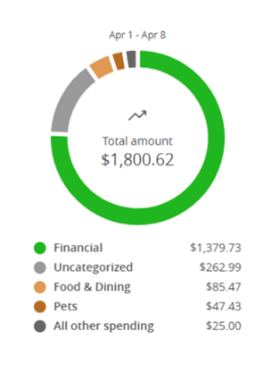
- ClickSWITCH
Easily update direct deposits and recurring payments. - CardSwap
Update your debit card information across your favorite subscriptions seamlessly and securely to maintain recurring payments without interruption. - CardHub
Add cards to digital wallets, monitor usage, and set real-time alerts. - Account-to-Account Transfers
Transfer money to other FSB customers with ease. - External Transfers Integration
Transfer funds to accounts outside of FSB without having to download a separate app. - Loan Payments
Pay off your loan online or right from your phone. - Credit Score Monitoring
View and track changes to your credit score 24/7. - Mobile Deposit
Enhanced mobile check deposit experience.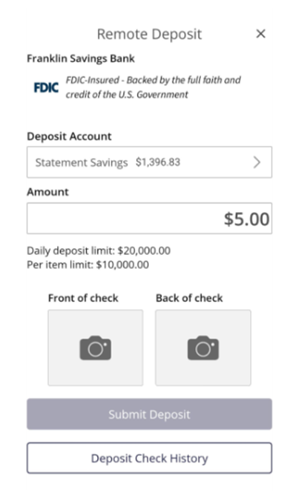

BUSINESS FEATURES
- Business ACH & Wire Management
ACH and wire services consolidated into one place to simplify payments. - Business Tax Payment Services
Manage and submit business tax payments right from online and mobile banking.
User Experience Enhancements
Your digital banking experience is about to get even better — with intuitive updates designed to make everything simpler and more user-friendly.
- Composable dashboard — a bright, new dashboard where you will be able to quickly view all transactions and account information.
- The ability to group accounts into targeted segments for easier viewing. (Checking, Savings, CD’s, Kids Accounts, etc)
- Quick links will be available right on the homepage to make transfers and contacting the bank simpler.
- Account tiles — All relevant information, including an asset summary for all accounts, is displayed on the homepage for easy viewing. For business customers, quick actions like transfer money, employee locked logins, and transaction approvals will appear on the right.
- A separate Business Banking tab will contain all the business functions, like Remote Deposit Capture, ACH, and wires for easier organization and tracking.
Customer Actions
Please take note of the following action items when preparing to gain access to our new digital banking system.
- Download the new FSB mobile app on or after June 30th.
- Your login ID will remain the same; click “forgot your password” when logging into the new app/online banking platform for the first time to create a new password.
- Business customers will download and activate new soft tokens.
When activating a soft token, two secure access codes are required for the initial login. This is a one‑time step. For all subsequent logins, only the username, passcode, and one secure access code will be required. - Business customers are encouraged to save any ACH and wire information that’s not in a template, as it will not migrate to the new platform.
- Online Banking Alert Information
- Existing alerts from the old system will not carry over
- Text alerts will come from 99588 or 86434
- Email alerts will come from alerts@franklinsavings.bank or notifications@franklinsavings.bank.